Markdown to PDF.for AI
Turn Markdown into a professional PDF in ~100ms. No Chromium. Zero-retention.

Plugs into your AI stack


Why not just do it yourself?
You just want a PDF — but libraries make you convert to HTML, run a heavy server, and break your flow just to generate it.
- ✗Takes ~5 seconds to be ready
- ✗Crooked, unpolished design
- ✗Your design gets lost
- ✗Slow agentic flows
- ✗Unhappy users
- ✗High infrastructure costs
- ✓Ready in milliseconds
- ✓Polished, presentation-ready design
- ✓You keep control of the design
- ✓Fast agentic flows
- ✓Happy users
- ✓Minimal infrastructure cost
A PDF engine you don’t have to build.
Forget about HTML, LaTeX, or complex CSS. Blink PDF transforms your Markdown flows into professional documents instantly. Quality and speed without the overhead.
"Did you know? A human blink takes ~100-400ms. We render faster than that."
Built from scratch — no Chromium
A deterministic engine written from the ground up on Bun. No headless browser, no cold starts — ~30 PDFs/sec on a single node, 100 pages in milliseconds.
Configurable & accessible
Headers, footers, page numbers, fonts and layouts — fully configurable. Every PDF is PDF/UA-1 accessible, with color emoji and proper Unicode.
Zero-retention by design
Your Markdown and the PDF are processed in memory and returned in the multipart response (pdf-0) — never written to disk, logged, or used to train a model.
Pure Markdown — full syntax
Full Markdown syntax in, a polished PDF out — no HTML, LaTeX or CSS. Import user-written Markdown directly: ideal for editors like Tiptap.
Clean API, predictable pricing
One clean REST call returns your PDF. Flat, volume-based pricing with no surprise overage — you always know what you’ll pay.
Built for massive scale
High concurrency that scales to a million render units a month on Business. From a handful of PDFs to millions — without your service falling over.
Engine performance
No headless browser. No cold starts. Predictable speed that holds under load.
Median render — even a 100-page document
PDFs per single node
Cold start — there is no browser to boot
Blink PDF vs headless Chromium (Puppeteer)
Chromium figures from public 2026 HTML-to-PDF benchmarks (Puppeteer ~5s serverless cold start; ~48–58ms warm per page). Blink PDF measured on a single node. Render time scales with document size; remote images add fetch time.
One clean call. PDF out.
Send Markdown — even raw LLM output — and get a finished PDF back. No HTML, no browser, no glue code.
curl -X POST https://api.blinkpdf.io/v1/render \
  -H "x-api-key: bp_..." \
  -H "Content-Type: application/json" \
  -d '{
    "items": [{
      "markdown": "
        # Invoice 0042

        Hi Jane, thanks for your business! Here's a quick
        summary of your subscription for this month.

        ## What's included

        - **Pro plan** — unlimited renders
        - Priority support
        - *Custom branding*

        **Total: $39** — paid on May 23, 2026.

        Questions? [Contact us](https://www.blinkpdf.io/).
      ",
      "metadata": { "title": "Invoice 0042" }
    }]
}'HTTP/1.1 200 OK
Content-Type: multipart/mixed; boundary=blinkpdf-…
X-Render-Ms: 96
X-Request-Id: req_8f3e2a...
# parts: pdf-0 (application/pdf) + manifest (application/json)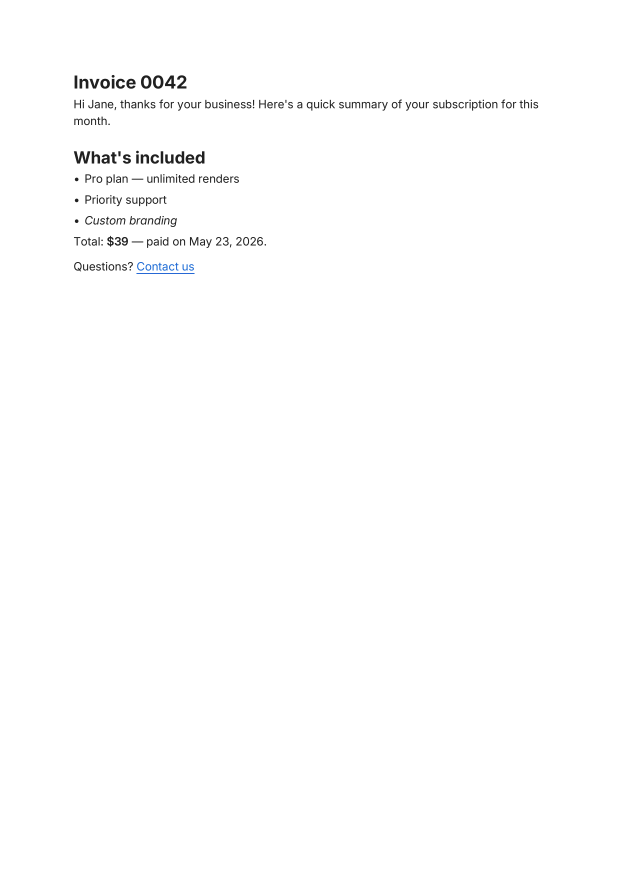
Made for the documents you actually generate.
From AI pipelines to mass digitization — if it starts as text, it ends as a polished PDF.
AI & LLM workflows
Turn ChatGPT / OpenAI responses into clean PDFs on the fly. Perfect for AI-native products and agents.
Invoices & reports with tables
Generate invoices, statements and financial reports — tables, totals and your branding included.
Notes & knowledge
Print Notion, Obsidian or Markdown notes as professional documents, ready to share.
Mass document digitization
Run large batches through your pipeline and turn them into PDFs at scale.
Security & data handling
Direct API renders are processed in memory and are never written to disk — built for teams that need precise, verifiable data handling.
Zero-retention API
Markdown you send, and the PDF you get back, live only in memory and are returned in the multipart response (part pdf-0) — never written to disk, logged, or used to train a model. (MCP hosted links and uploaded assets are kept 24 h so your automation can fetch them.)
Encrypted & hashed
All traffic is encrypted with TLS. API keys are stored as SHA-256 hashes and compared timing-safe; passwords are one-way hashed (Better Auth). Responses ship hardening headers and a strict CSP (default-src 'none').
Authenticated access
REST authenticates with bp_ API keys; the MCP server supports OAuth 2.1 with PKCE. Dashboard sessions use Secure, HttpOnly cookies. Rate limiting and SSRF protection guard every request.
Frequently Asked Questions
Everything you need to know about rendering Markdown to PDF.
What is Blink PDF?
Can I use it with automation tools like n8n or Make?
How do you handle data privacy?
Do I need to know CSS or LaTeX?
Who is this for?
Why is it so fast?
Industrial-Grade Assets from Simple Markdown
Stop fighting with layouts and design debt. Blink PDF is the definitive engine to turn your raw intent into boardroom-ready assets instantly.